On the App Store

Describean app.Use it.

Type what you want in plain English. SnapApp writes the code and runs it on your phone, inside the app.

Download on the App Store

iPhone · iOS 15.1 or later · 37 MB

How it works

Three things happen.

You describe it

One sentence is enough. There is no template to choose and no settings to fill in.

What do you want to build?

“A tip calculator with bill splitting”

SnapApp builds it

The loading screen tells you where it has got to.

  • Understanding your idea...
  • Designing your app...
  • Writing your app...
  • Putting it together...
  • Almost there...
  • Polishing...

You use it

The app opens and works. Ask for a change in plain English and SnapApp revises it in place, keeping the earlier version.

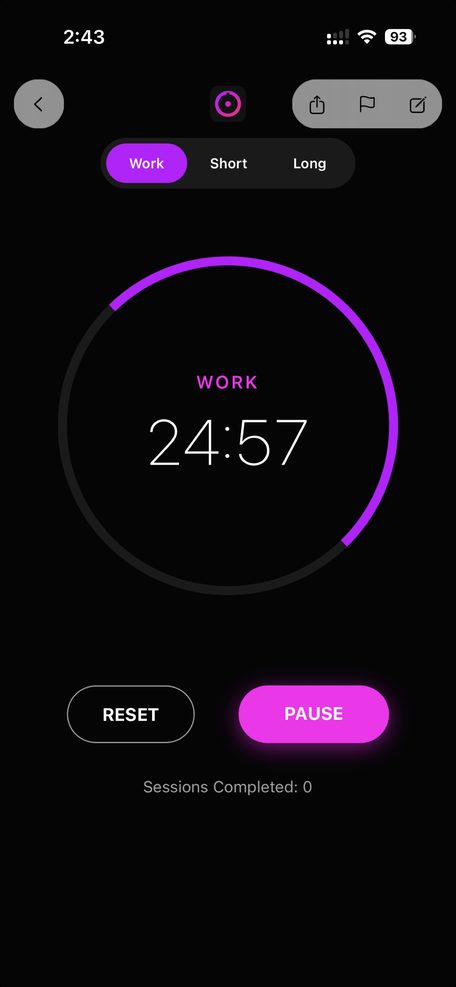
A generated Pomodoro timer running in SnapApp, showing 24:57 on a magenta progress ring.

Examples

Six apps and the sentences that made them.

These ship inside SnapApp. Each one was written by the same pipeline you get when you type your own idea.

Neon Focus

A high-contrast Pomodoro timer featuring a vibrant electric purple to hot pink gradient ring and a sleek dark mode aesthetic.


Prompt

A Pomodoro focus timer with a large circular countdown ring that fills with a gradient from electric purple to hot pink. Dark background. 25-minute sessions with Start/Pause/Reset, session count, and short/long break toggle.

GlobeGlider AI

Smart multi-day travel itineraries customized for any destination with AI-powered activity and dining suggestions.


Prompt

A trip planner where I type a destination city and number of days, and AI generates a day-by-day itinerary with activities, restaurants, and tips. Show each day as an expandable card with morning/afternoon/evening sections. Travel-themed blue and orange colors.

Charcoal Spend

A sleek dark-mode expense tracker with categorical bar charts and AI-powered financial insights.


Prompt

An expense tracker where I can add expenses with a name, amount, and category (Food, Transport, Entertainment, Shopping, Bills). Show a bar chart of spending by category with bright colors, total spent, and budget remaining. Dark charcoal background.

Amber Pantry AI

Transform your available ingredients into gourmet meals using AI-powered recipe generation.


Prompt

A recipe generator where I pick ingredients I have on hand from a list of common items (chicken, rice, garlic, tomatoes, etc). AI creates a recipe using my selected ingredients with step-by-step instructions and cook time. Warm amber and orange kitchen theme.

OmniTrivia AI

Infinite quiz generator that creates custom trivia sets on any topic you can imagine using Gemini AI.


Prompt

A trivia game where I pick any topic (like Space, 90s Movies, World History) and AI generates 5 multiple choice questions about it. Show one question at a time with 4 answer buttons, score tracking, and a results screen. Dark purple background with bright yellow accents.

Elemental Pro

High-performance interactive periodic table with search and AI-powered chemical insights.


Prompt

An interactive periodic table where I can tap any element to see its name, symbol, atomic number, mass, category, and a fun fact. Elements colored by category (metals red, noble gases purple, nonmetals green, etc). Search bar to filter. Clean white background.

FAQ

Questions.

Do I need to know how to code?

No. You describe the app in a sentence and SnapApp writes the code for you. If you want to look at the code, there is a source editor built in.

Where do the apps run?

Inside SnapApp on your iPhone. SnapApp writes the app on a server and runs it on your phone. There is no build step and nothing extra to install.

Can I change an app after it is built?

Yes. Describe the change and SnapApp revises the app in place. Earlier versions are kept, so you can go back.

How long does a build take?

Seconds for something small, longer for something with several screens. You watch the phase labels change while it works, and you can cancel.

What does it cost?

SnapApp is free to download and offers in-app purchases. The Pro tier gives 10x more usage.

What do I need to run it?

An iPhone running iOS 15.1 or later. The download is 37 MB and the app is rated 4+.